The google talk blog says that every time we send in a char we emit 0.0000000000000000034 metric tons of co2. Ok from the look of it not too much but when we chat we atleast type/send in a thousand or million chars and that's too much.
What's the solution use sms language.For example, if we want to say:
As far as I'm concerned, you can give me the twenty dollars you owe me when I see you later.
You could save more than 50% in wasted characters by saying:
AFAIC, U can gve me the 20 $$ YOM whn I CUL8R.
that some big reduction . You can start small and then leap ahead
Showing posts with label Gtalk. Show all posts
Showing posts with label Gtalk. Show all posts
Friday, April 4, 2008
Google talk going green


Saturday, August 11, 2007
I dont use Gmail Chat.
What if you seldom or never use Gmail chat.You can do some things
1- Use non-chat version of Gmail this makes it a bit faster to load.Link is present at the bottom when you log in to your Gmail
2- If you use labels more often then you can swap their places. You can place the "Quick Contacts" block below the "Labels" block .To do this
- Go to Settings
- Click on the Chat tab.
- You will find "Quick Contacts location" setting
- Select it's position
- Then save changes
Tuesday, July 24, 2007
Group Chat
The Google Talk gadget today launched a new multiple user chat interface. Multi-user chat was hinted at in April but it was unclear at that time .

It’s not available in the real Google Talk client or in Gmail. When you start a multiple user chat from the gadget, the friends you invite are sent a link to click on which takes them directly to the web-based version of the client .So even if they are on Gtalk or Gmail they are notified.

pics from zdnet
Sunday, June 17, 2007
Gtalk- Click-To call
Google has enterd a new segment of adverstising . Google and eBay have signed an agreement around text-based advertising and "click-to-call" advertising, in which Google Talk and Skype will power voice calls between customers and merchants. (Read the full press release here.)
Google and eBay also plan to integrate and launch "click-to-call" advertising functionality within eBay's U.S. and international marketplaces and Google's search platform. The click-to-call capability will allow a user to click on a link or icon within a product or service advertisement to initiate an Internet voice call to participating eBay merchants or Google advertisers directly from either company's respective sites, using Skype or Google Talk.
Click-to-call advertising is an emerging e-commerce model that brings buyers and sellers together by opening up new ways for advertisers and merchants to generate customer leads using the Internet. It is particularly valuable for merchants or advertisers who may not have a website, or who currently use channels such as local directories to reach potential customers.
Starting in the near future, Skype will offer its users the option to download the Google Toolbar, to which Skype will add a custom button. The companies will also explore interoperability between Skype and Google Talk via open standards to enable text chat and online presence
GTalk Password Recovery
Google Talk Password Recovery is a utility for finding and decrypting
Google Talk and GMail passwords that are stored on your computer with
a click of a button! This password decoder works when "Remember Password"
checkbox is ticked in Google Talk instant messenger. Passwords from multiple
profiles can be recovered, all versions of Google Talk are supported.
This password decoder will also find a saved password from Gmail Notifier.
Google services passwords from Firefox and Internet Explorer are recovered
too. Try out this password decoder for FREE:
Download Google Talk Password Recovery

Functionality of Google Talk password recovery - in other words, what
this tool can do:
Saturday, June 16, 2007
Gtalk for mac
Now you can make a Google Talk account by default, without having to mess with all the Jabber settings. Till now you had to mess up with Jabber but no more
Maybe in future they may add voice to the Google Talk client . Apple may not be interested in adding another service by default .There is no way for Mac users to send files to the official Google Talk client. If Google does something about then something is possible.
Gtalk Emoticons
Are you Tired of expressing your emotions with words? Frustated & Exhausted by pressing keys/code to enter an emoticon? Then Gtalk has launched a new feature.this designed by Jake Knapp ,User Interface Designer of google.
The Google Talk Gadget has introduced an emoticon menu to put those :D and :-( feelings . You can choose from three different styles of emoticons.From simple and classic  . to colorful and fun
  . Or maybe a square
  . This is one of the feature that google had lacked compared to other Im but not any more.
Gtalk Popout
To make it easier to use Google Talk anywhere, Google has launched Poput feature . Now it's possible to pop out the Google Talk Gadget into a separate window. I f you're using Google Talk on your Google Personalized Homepage, you'll find a link in right inside the gadget that lets you pop it out. You can also find the popout version of the gadget at http://www.google.com/talk.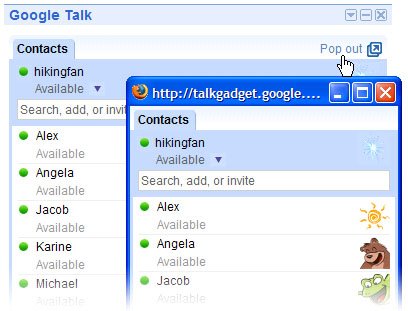
Google launched Gtalk gadget for website owners and bloggers. Now You can add Google Talk to your own webpage with a single line of code. With the launch of popout feature it has it it to a new level. You can add Google Talk Button to your website: a button that lets your visitors launch Google Talk in a separate window.
To add the button, just copy and paste this script into your site's HTML:
Google Talk on your BlackBerry
Now, you can also use Google Talk on your BlackBerry.
Google Talk™ for BlackBerry® devices extends the look and functionality of Google's exciting new desktop instant messaging client to the BlackBerry platform. Now BlackBerry users with a Gmail™ Username and password can send and receive instant messages with friends, family and colleagues in the Google Talk community while on the go.
Google Talk for BlackBerry devices allows you to:
- Access your existing Google Talk Friends list on your BlackBerry device and add additional contacts from the Google Talk community and in federated communities
- Access Friends in your Gmail address book to invite them to Google Talk
- See which Friends are online and available and participate in several conversations at once
- Send and receive messages in real time
- Continue to communicate with other Google Talk users even while using other applications on your BlackBerry device
- Access open conversations and new Google Talk messages from within the BlackBerry Messages application
- Set up custom notifications for new Google Talk messages
Download Google Talk for BlackBerry devices at http://www.blackberry.com/GoogleTalk.
Psi
Using Psi
Before you use you'll need to configure your client to connect to the Google Talk service. Here's how:
- Open Psi.
- Click the Psi symbol in the bottom-left corner, and select Account Setup.

- Click Add in the Psi: Jabber Accounts window.
- Enter a name for your account in the Name field (we suggest 'Google Talk').
Also, make sure that the box next to Register new account is not checked. - Click Add.
- In the Jabber ID field:
- If you're signing in with a Gmail or Google Mail username, enter your full email address.
- If your Google Talk username isn't associated with any Google email service, add @gmail.com to the end of your username. For example, iloveyoko will become iloveyoko@gmail.com.
- If you're a Google Apps user, enter your full email address (gordon@example.com).

- Enter Psi in the Resource field. If this field is left blank, you won't be able to sign in.
- Open the Connection tab.
- Check all boxes.
- Enter talk.google.com in the Host field, and enter 5223 in the Port field (5222 will not work).
- Click Save.


Congratulations! You're now ready to connect to the Google Talk service using Psi.
Once you've configured Psi to connect to the Google Talk service, you may receive a warning message that stating that "The gmail.com certificate failed the authenticity test." This error message is incorrect; click Continue to sign in.
iChat
Here's how to configure iChat to connect to the Google Talk service:
- Open iChat.
- From the iChat menu, select Preferences...

- Click Accounts along the top of the dialogue box.
- Click the + button along the bottom to add a new account.

- Select Jabber Account from the Account Type drop-down menu.
- Enter the following information in the appropriate fields:
- Jabber ID:
- Password: Your password.
- Server: talk.google.com

- Click Add.
- Highlight your new account in the Accounts section, and then click Server Settings.
- Enter the following information in the appropriate fields:
- Server: talk.google.com
- Port: 5223

- Check the boxes next to Connect using SSL and Allow self-signed certificates. You don't need to check the box next to Warn before password is sent insecurely -- your password is always secure with Google Talk.
- Enter iChat in the Location field. If this field is left blank, you won't be able to sign in.


Congratulations! You're now ready to connect to the Google Talk service using iChat.
Tips:
- Once you've configured iChat to connect to the Google Talk service, you may receive a warning message that states your username and password will be transferred insecurely. This error message is incorrect; your username and password will be safely transferred.
What Are you listening
If you'd like to show your contacts what music you're listening to at that very moment, select Show current music track from the Available or Busy section of your status drop-down menu.
Your status will automatically update each time your supported music player starts a new song, listing the track name and artist information. If you stop your music, your status will display the default Available or Busy message.
It currently support the latest version of the following music players:
- iTunes
- Windows Media Player
- Winamp
- Yahoo Music Engine
Show the world your taste.
Pidgin
Using Pidgin
To configure your account:
- Open Pidgin.
- From the Accounts menu, select Add/Edit.

- Click Add from the Accounts window.

- Enter the following information in the Add Account window:
- Protocol: XMPP
- Screen Name: your Google Talk username (without any @ symbol or domain).
- Server: Enter a server value depending on your type of account:
- Gmail account users should enter gmail.com
- Google Mail accounts (example@googlemail.com) should enter googlemail.com
- If you're signing in with a Google Account that's not linked to any Google
email service, enter gmail.com - Google Apps users, please visit the Apps
Help Center for instructions - Password: we suggest leaving this field blank for increased security, but
if you'd like to log in automatically, enter your password - Local Alias: leave this field blank
- Remember password: check the box if you'd like Pidgin to remember
your
password (you won't be prompted to enter it each time you log in, if you
select this
option) - New mail notifications: check the box if you'd like Pidgin
to notify you of unread email in your inbox.
- Click Save.


Congratulations! You're now ready to connect to the Google Talk service using Pidgin.
Extended talk
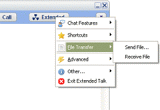
Extended Talk is a massive add-on for Google Talk, Google's IM Client, based on the Jabber system .
Here are some key features of "Extended Talk":
· Easy button: A button added to the chat windows gives easy access to ET's features
· Active Status: Dynamically change the status of your Google Talk.
· You can add the current time, the latest RSS news, or even what you are currently browsing
· Custom images: Send images with Google Talk (Like big emoticons).
· Your friends also need ET for this feature to work
· File Transfer: Transfer files between two users using ET
· /commands: such as: /signout, /away and /1337
· Smileys: Replace the blue text smilies with graphical ones!
(you can also use your own set of smilies) (only visible locally)
· Desktop friends: Floating contacts on your desktop like Messenger Plus
· Boss protection: Hides all Google Talk windows with a press of the shortcut key
· Locking: Lock Google Talk to prevent anyone from accessing it
· Font color: Change the color of the text you send (only visible locally)
· Chat Background color changer: Change the white background area and the typing area in chat windows to whatever you want (only visible locally)
· Shortcuts: Quickly enters your date, time, IP, Google Talk version, or operation system.
· Text filtering: Want to speak 1337? This is the feature for you
· Transparency: Make Google Talk see trough
· Text Recall: Recall the last 5 things you typed.
· Underline support: Adds the ability to use underline, a feature left out of Google Talk (only visible locally)
· Bold and Italic support: Adds Ctrl+B and Ctrl+I shortcuts, instantly making text bold and/or italic
· Run at startup: Extended Talk will run every time you start your computer
· And last but not least: Extended Talk is free and contains no spyware, adware
Here are some key features of "Extended Talk":
· Easy button: A button added to the chat windows gives easy access to ET's features
· Active Status: Dynamically change the status of your Google Talk.
· You can add the current time, the latest RSS news, or even what you are currently browsing
· Custom images: Send images with Google Talk (Like big emoticons).
· Your friends also need ET for this feature to work
· File Transfer: Transfer files between two users using ET
· /commands: such as: /signout, /away and /1337
· Smileys: Replace the blue text smilies with graphical ones!
(you can also use your own set of smilies) (only visible locally)
· Desktop friends: Floating contacts on your desktop like Messenger Plus
· Boss protection: Hides all Google Talk windows with a press of the shortcut key
· Locking: Lock Google Talk to prevent anyone from accessing it
· Font color: Change the color of the text you send (only visible locally)
· Chat Background color changer: Change the white background area and the typing area in chat windows to whatever you want (only visible locally)
· Shortcuts: Quickly enters your date, time, IP, Google Talk version, or operation system.
· Text filtering: Want to speak 1337? This is the feature for you
· Transparency: Make Google Talk see trough
· Text Recall: Recall the last 5 things you typed.
· Underline support: Adds the ability to use underline, a feature left out of Google Talk (only visible locally)
· Bold and Italic support: Adds Ctrl+B and Ctrl+I shortcuts, instantly making text bold and/or italic
· Run at startup: Extended Talk will run every time you start your computer
· And last but not least: Extended Talk is free and contains no spyware, adware
Gtalk Gadget
Google Has launched GTalk Gadget today. The Google Talk Gadget is a web-based module that you can add to your Google Personalized Homepage, letting you see your friends and chat with them -- all on your homepage.
You'll find all your Gmail and Google Talk contacts organized for you in the Talk Gadget. And just like with Gmail Chat, you don't have to download and install software to use it. No matter where you go, all you have to do is login to your Google account, and there it is.
You can also put it on your webpage or blog, so your visitors can sign in and start instant messaging right from your page.
So give it a try.
Gtalk skin-Bsod

Description: Microsoft's infamous BSOD (Blue Screen of Death) brought to Google Talk. Download
Gtalk Skin--Digg

Download Digg like skin For those who love the style and appearance of Digg.
This transforms gtalk into Digg like.
Gtalk skins

Following are some of the skins for Gtalk from customized life
- Banana Pack
Description: A pack of two themes: banana and steel banana.
- Boo
Description: A mix of swiss and serene, but with some nice twists.
- Bubblegum
Description: Although named bubblegum, this theme has smooth speech bubbles for incomming / outgoing messages, instead of the normal ones.
- CandyBars
Description: A port of the Candybars theme used in Adium.
Download Description: A colorful glossy theme for your Google Talk!
Registry Tweaks
You can edit most settings. By editing the registry you can do it.
To open registry editer ( regedit) in Xp
- Click on "start".
- Select "Run "
- Now type "regedit",
To Edit settings of Gtalk
- Navigating to the key HKEY_CURRENT_USER\Software\Google\Google Talk.
The "Google/Google Talk" key has several sub-keys that hold different option values:
Accounts: This one has subkeys for each different account that has logged in on the client. These keys have different values that store the username, password and connection options.
Autoupdate: It Stores the current version information.
Options: This is the most interesting part, where most of the current hacks should be used (keep reading).
Process: Stores the process ID. It is used by Google Talk to detect if it's already running or not.
- HKEY_CURRENT_USER\Software\Google\Google Talk\Options\show_pin
If 1, shows a "pin" next to the minimize button that keeps the windows on top of all the other open windows when clicked. - HKEY_CURRENT_USER\Software\Google\Google Talk\Options\view_show_taskbutton
If 0, hides the taskbar button, and leaves the tray icon only, when the window is shown - HKEY_CURRENT_USER\Software\Google\Google Talk\Options\away_inactive
If 1, status will be set as Away after the specified number of minutes. - HKEY_CURRENT_USER\Software\Google\Google Talk\Options\away_screensaver
If 1, status will be set as Away after the specified number of minutes. - HKEY_CURRENT_USER\Software\Google\Google Talk\Options\inactive_minutes
Number of inactive minutes to become away if auto-away is on.
XXXX is typing
How to know if some one is replying??? What i mean is Some thimes the other guy i typing a long message & you may feel that he is not replying.
You may look at the Top it say XXXX is typing. But there is even a easier way.
At the typing box you will find a keyboard icon ( as in pic) it means he is typing & not you are

Subscribe to:
Posts (Atom)


